Turn voice notes into
publish-ready content.
Record a voice note on your phone, laptop or tablet. Zinggit transcribes your spoken words into a clean master transcript — then generates a blog post, LinkedIn post, YouTube script, newsletter or presentation in your actual voice.
No blank page. No generic AI output. Just your thinking, ready to publish.
No credit card needed · Works on any device
How it works
From voice recording to published content in three steps.
Most content tools start with a blank page. Zinggit starts with your voice — rough, unfiltered, exactly how your thinking actually sounds. Speak it, transcribe it, publish it.
Record a voice note anywhere
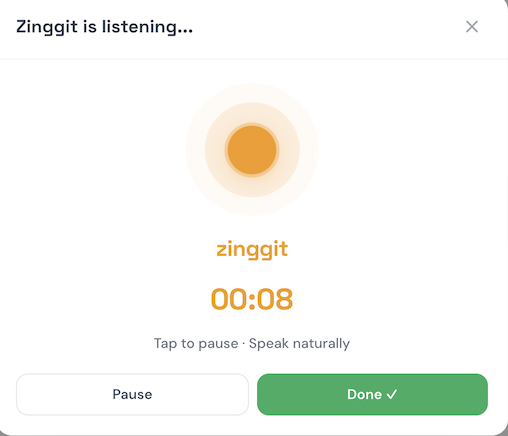
Tap record on your phone, laptop, or tablet. Speak your idea — on a walk, between calls, whenever a thought hits. Zinggit works on any device, no app download required. No typing, no losing the thought.
→Zinggit transcribes your spoken words
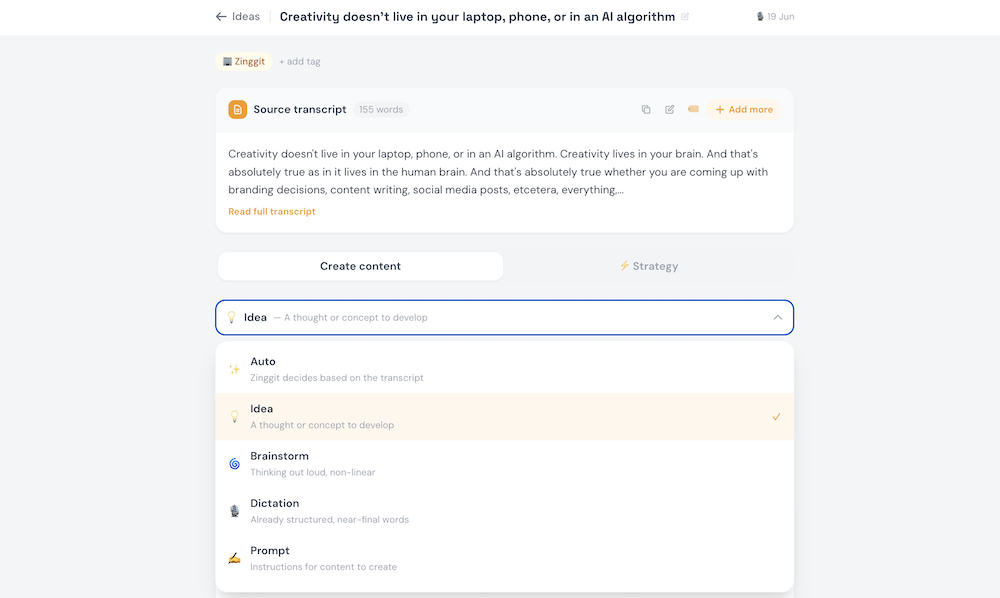
Your voice recording is automatically transcribed into a clean, readable transcript — your personal dictionary corrects brand names and proper nouns as it goes. Every spoken word captured and stored in your searchable idea library.
→Generate multiple content in your voice
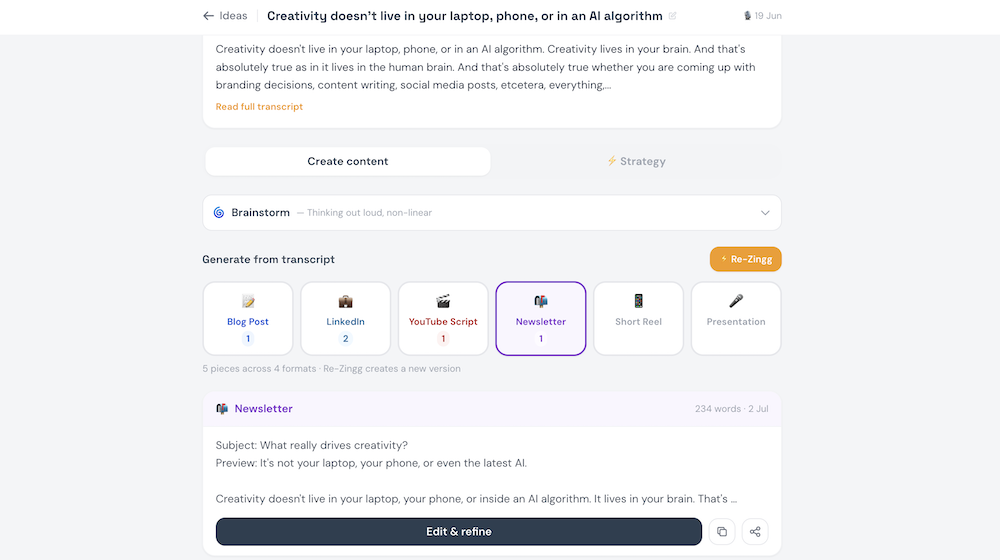
Select blog post, LinkedIn post, YouTube script, newsletter, short reel or presentation. Zinggit generates publish-ready content in your voice, in seconds — all six formats from a single voice recording.
Why Zinggit
The voice to content tool built for creators — not enterprises.
When you’ve tried other options — or you’re thinking ChatGPT will do it for less — here’s the real deal.
Zinggit isn’t a chatbot and it isn’t a dictation app. It’s the gap between having an idea and publishing content that reflects how you actually think — a gap that none of the tools below were built to close.
ChatGPT or Claude
- No fiddly setup — record, generate, done
- Multiple content outputs ready to go from one voice note
- Designed to sound like your voice from the start
- Creator plan cheaper than a monthly LLM subscription
- Easy to manage searchable idea library built in
Copy.ai or Jasper
- Starts with your voice, not a brief you have to type
- Voice fingerprint learns how you write — not a style setting
- Built-in keyword research and content strategy at Pro
- Simpler, faster, purpose-built for voice-to-content
- Free tier with unlimited transcription, no trial window
Otter.ai or transcription tools
- Transcript is the input, not the output
- Six content formats generated from every recording
- Strategy layer shows what content to create next
- Works for solo ideas — not just meetings
Custom AI agent
- Ready to go — no setup, no prompts to write
- Built to use your voice and output your content
- Works on any device, anywhere, any time
- Includes built-in content strategy — no extra tools needed
- Improves the more you use it, automatically
Who uses Zinggit
Built for thought leaders,
designed for scale.
Used by agencies, SaaS marketing teams, solo creators and product marketing consultants. Here’s what it looks like in practice.
Repurpose your content across platforms for maximum engagement.
Share your ideas on LinkedIn, turn that same note into a video script in seconds and even turn it into newsletter content for Substack. Unleash your creativity and free up your time.
- Record your thoughts anywhere — have 3 versions ready to go in minutes
- Voice fingerprint learns your style the more you use it
- No more missed ideas… Speak it, Zinggit, go
“I was recording ideas on my phone but never doing anything with them. Now they become posts — LinkedIn, newsletter, video script, all from the same voice note.”
Clear the output bottleneck and hit those deadlines with no fuss.
Juggling input from the product team, c-suite and the founders? Take meeting transcripts, messy project briefs and unstructured feedback and turn it into content.
- Record a founder debrief and get posts in minutes
- Multi-speaker transcription for team meetings
- Get search terms and content strategy from your transcripts
“We brief content with a 10-minute voice note. The draft is waiting before I’ve finished my coffee.”
Extract client knowledge from call recordings and meetings.
No more scraping meeting recordings for that valuable piece of information. Use Zinggit to capture chats, optimise the output and turn it into scalable output in minutes. Free up your afternoon.
- Record a post-call debrief, get a client content piece
- Searchable idea library across all your client work
- Content gap analysis built into every recording
“Client strategy sessions used to produce notes. Now they produce content.”
You’re building something great — so don’t let your publishing hold you back.
You know you should be posting, but content isn’t your focus when you’re wearing five hats. Speak to Zinggit between calls for 30 seconds and get ready-to-go posts for socials, marketing teams and more.
- Capture ideas in real time, not retrospectively
- Six formats from one recording — post everywhere from one thought
- Build a library of your thinking as the company grows
“I had 40 saved voice memos and zero posts. Now they actually go somewhere.”
Your brainstorm just got
a strategic layer.
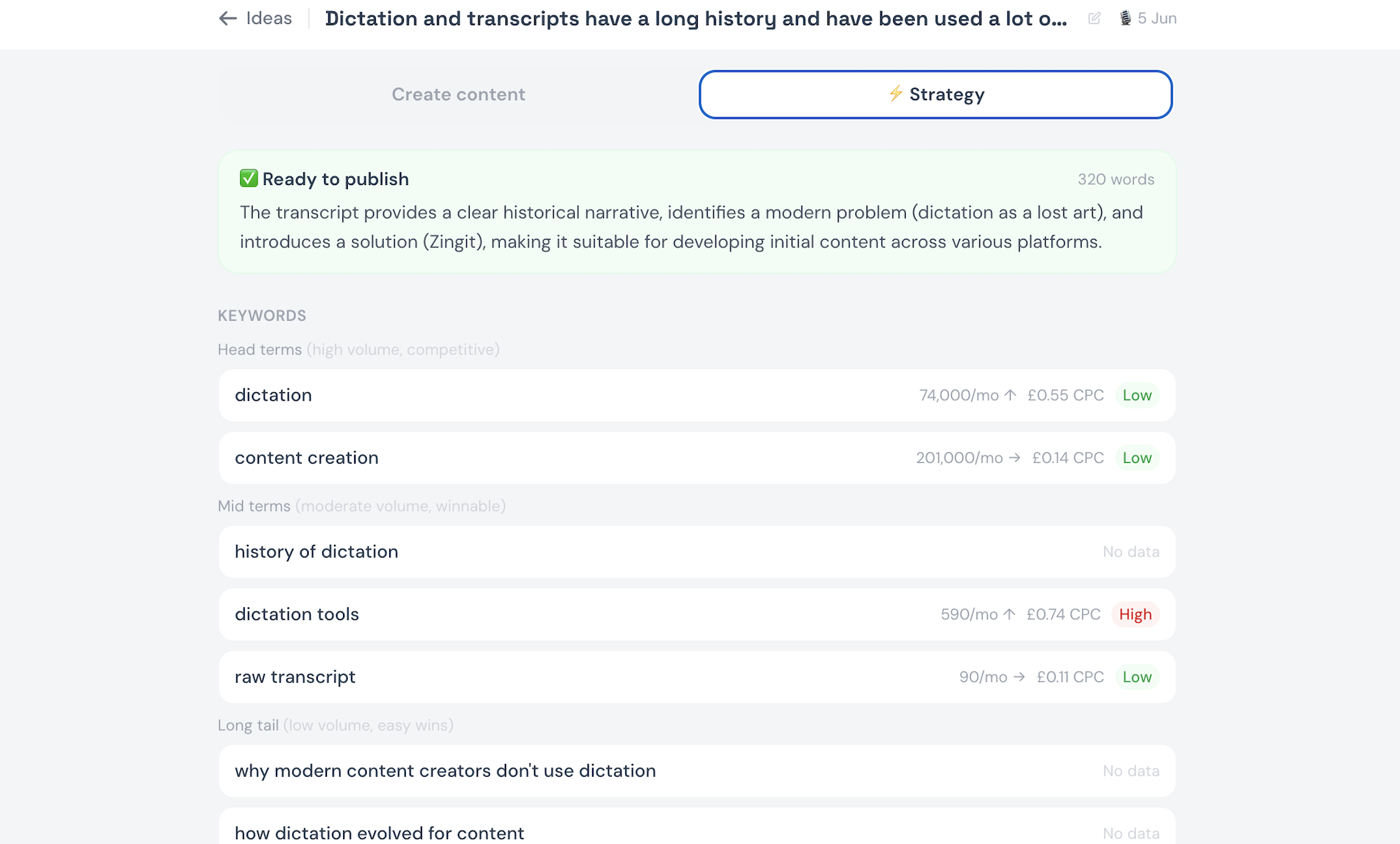
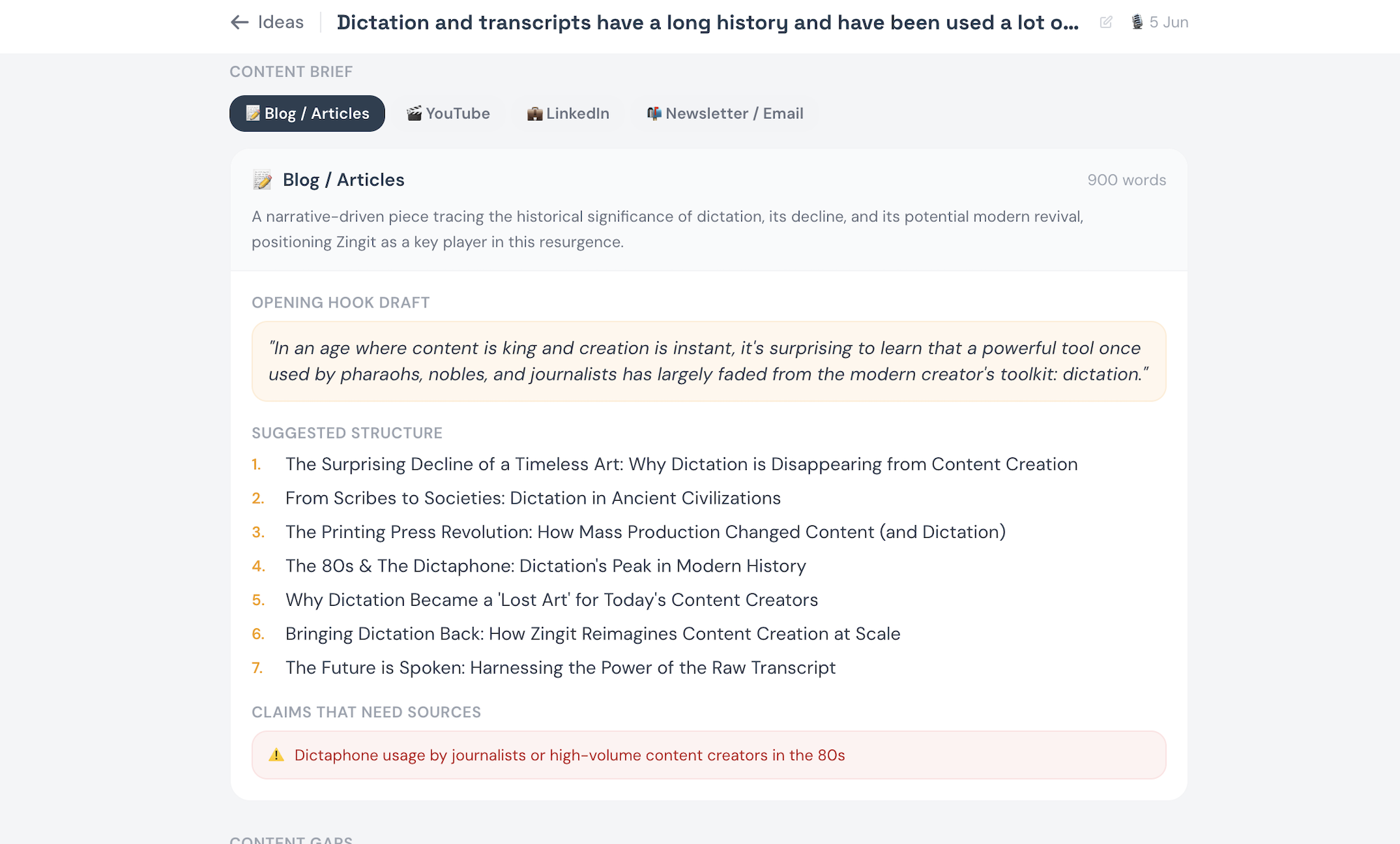
Wondering where to take that idea? Zinggit’s Strategy tab explains topic gaps, focus keywords for search and ways to make your content AI-search optimised. No other voice to text or voice transcription tool does this — it’s unique to Zinggit.
🔑 Live keyword data
Real search volume for your topic, pulled automatically from your transcript.
🕳 Content gap analysis
What your transcript missed — angles your audience is actually searching for.
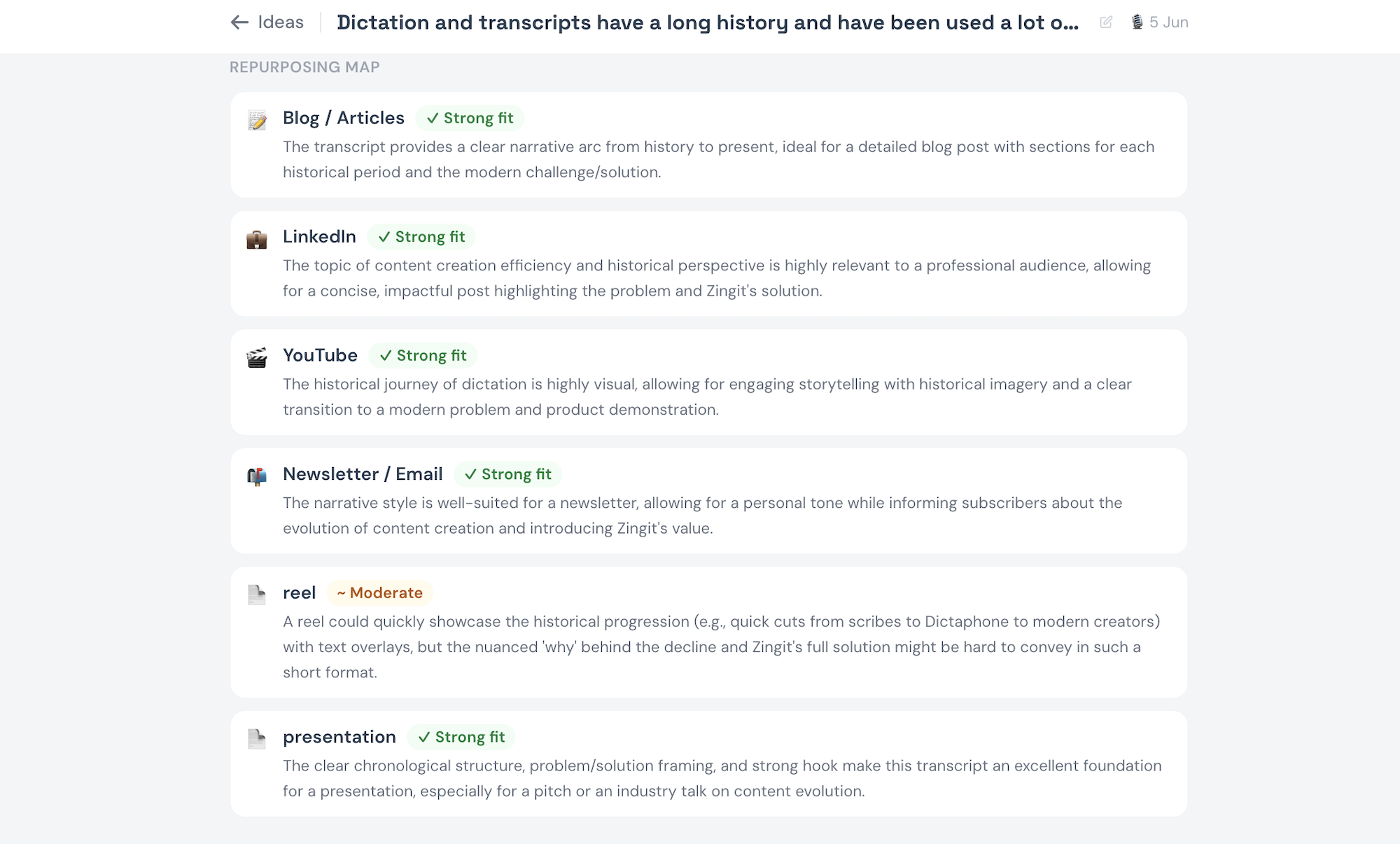
🗺 Repurposing map
Which formats fit this idea best — and why. Before you generate anything.
🤖 AI search optimisation
The primary question your content should answer to surface in AI-generated results.
Pricing
Start free. Scale when you’re ready.
Simple, transparent pricing. No hidden fees. Team plan launching soon.
- Voice-to-transcript
- Searchable idea library
- Works on any device
- All 6 content formats
- Unlimited generations
- My Voice profile
- Personal dictionary
- Re-Zingg versions
- Share links
- Everything in Creator
- Adaptive voice learning
- Strategy tab
- Keyword research
- Content gap analysis
- AI search optimisation
- Priority processing
- Everything in Pro
- Shared workspace
- Team library
- Multi-user management
FAQ
Common questions about Zinggit.
Turn your next voice note into
copy ready to publish.
Free to start. 7 days of Pro on us. No credit card required.
Get started FREEWorks on Android · iOS · macOS · Windows · Linux


Latest News & Articles
Read our how to guides and tips and tricks to get the most from your content
-

How to Transcribe an Interview (In the Least Fiddly Way)
If you’ve ever sat down to transcribe an interview manually, you know the drill. One hour…
-

AI Transcription Software: The Complete 2026 Guide
AI transcription software has matured faster than almost any other category in the last two years.…
-

How to Build Thought Leadership Content
The life of a thought leader, especially when you’re building a personal brand intertwined with a…



Start creating with Zinggit…
Made for busy creators with tons of ideas and no time to note them down. Dictate, brainstorm, bounce around an idea or speak your prompt to get content Zingged in seconds. Use your raw transcript to repurpose into multiple content sources – a weeks worth of content from one voice note!